Open Pharma Plugins / Documentation
Open Pharma Plugins
A set of reviewable workflows for pharmaceutical commercial teams. Understand the business problem, inspect a fictional input and output, then follow the technical guide when you are ready to implement.
Installation
Choose an installation path
Install the complete plugin in an agent harness, or use the published Python distribution for a Python-managed MCP server.
Open the plugin repository →Read the installation guidance →
Choose your reading path
See the problem, the capability, the expected outcome, and the human review boundary in plain language.
Explore business outcomes → For technical teams Start with the implementationChoose an install surface, inspect example files, and continue into version-pinned configuration and operations.
Open the implementation path →What problem does the portfolio solve?
Important work is fragmented
Research, planning, training, and campaign preparation often happen across disconnected searches, files, and handoffs. Evidence and assumptions can disappear between steps.
Six focused, inspectable plugins
Each capability structures a narrow workflow and keeps its inputs, source support, constraints, and review status visible.
A decision-ready artifact
Teams receive a cited profile, evidence brief, scenario, engagement plan, learning draft, or campaign review package that a qualified person can examine.
Portfolio architecture
How the portfolio fits together
Each capability stays independently installable, so teams can choose the workflow they need and bring its Skill and MCP tools into a supported agent environment.
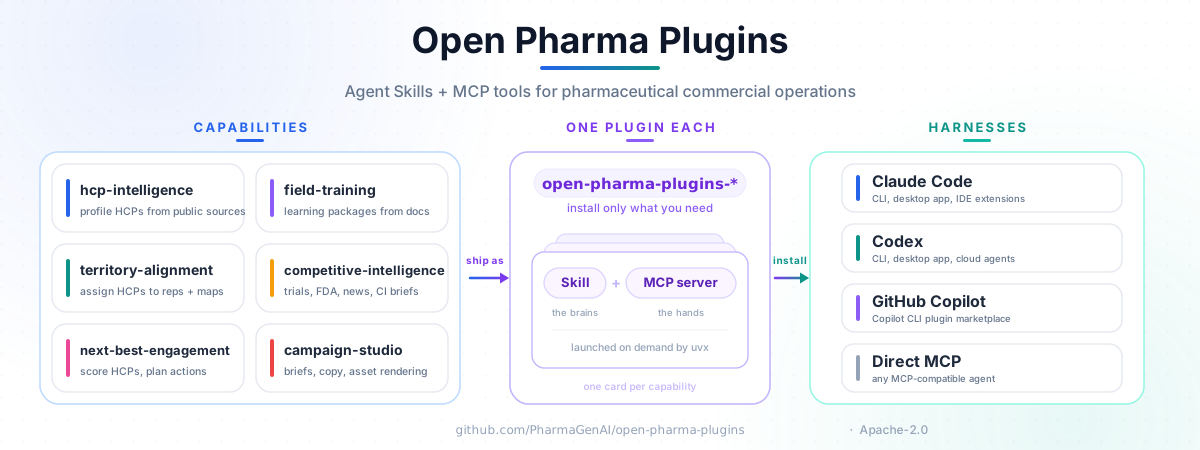
Plugin guides
Choose the question closest to the work in front of you. Every guide explains the problem, objective, workflow, fictional sample input, interpreted output, business value, and technical next step.
Use one capability on its own, or connect outputs only where identifiers, provenance, and governance remain intact.
| Capability | Business question | Expected output | Version |
|---|---|---|---|
| 01HCP Intelligence | How do we prepare for an account conversation? | Cited public-source profile | HCP 1.0.2 |
| 02Competitive Intelligence | What changed in the market? | Evidence brief and timeline | CI 1.1.0 |
| 03Territory Alignment | Which coverage scenario works best? | Assignment and route scenario | TA 1.2.0 |
| 04Next-Best-Engagement | What should the team consider next? | Consent-aware engagement plan | NBE 1.0.2 |
| 05Field Training | How do we build learning from approved sources? | Learning and role-play draft | FT 1.1.1 |
| 06Campaign Studio | How do we prepare material for review? | Campaign review package | CS 1.1.0 |
Documentation contents
Understand
Purpose and outcomes
- Business outcomes — match a decision to a capability
- Plugin guides — problem, solution, workflow, and value
- Trust and governance — data, evidence, and review boundaries
Try
Installation and examples
- Get started — agent harness and Python distribution paths
- Fictional examples — input, output, and manifest for every plugin
- Release snapshot — machine-readable version provenance
Operate
Technical references
- Technical reference — pinned configuration and repository guides
- Release sync — website update and review contract
- Website source — public documentation repository